Here are the steps necessary to set up your UMW NetID. If you have any questions or problems, please contact the Help Desk for assistance.
1. Find Your NetID & E-mail Address
Information on finding your NetID and E-mail address is at http://technology.umw.edu/helpdesk/netid/
IMPORTANT NOTE:
- Student email addresses end with @mail.umw.edu
- Employee email addresses end with @umw.edu
If you are unable to find your name after searching, your account may not have been created. If you are new to the university, or just paid a deposit, it may take a working day for the account to be created. If you have questions about this, please contact the Help Desk for assistance.
2. Know Your Temporary/Default Password
IMPORTANT:
Temporary/Default passwords DO NOT allow you to log into UMW systems – they can only be used to reset your password.
All new accounts are given an 14-character temporary password.
This temporary password is comprised of:
Uppercase first letter of your legal first name
+
Lowercase first letter of your legal last name
+
Last 4 digits of your Social Security Number
+
2 digit designation of your birth month (e.g., April = 04)
+
The text “Eagles” (note the initial uppercase “E”)Example:
First Name: John
Last Name: Smith
Last four numbers of your SSN: 1234
Birth month of July : 07
Temporary Password would be: Js123407Eagles
If the University has no Social Security number or birth date on file, use the Last 4 digits of your Banner ID + “99”. If you don’t know your Banner ID, please contact the Help Desk.
Example:
First Name: John
Last Name: Smith
Last 4 Digits of Banner ID: 7890
Add: 99
Temporary Password would be: Js789099Eagles
3. Reset Your NetID Password
To reset your NetID password go to http://password.umw.edu and click “Change your UMW NetID Password.”
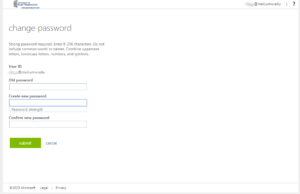
If you try too many times to change your password, or you try to login to our systems with a wrong password your account will lock. This is an IT security safeguard. You must wait 15 minutes for the account to automatically unlock before trying again.
- Enter your full email address (for example: netid@mail.umw.edu).
- Enter your Old/Temporary Password.
- Come up with a new password that has at least 14 characters, at least one uppercase letter, one lowercase letter, one number, and one special character. A strong password is required. Enter your password in the “New Password” field and ensure that the “Password strength” is listed as “Strong”.
- Re-enter in your password in the ‘Verify Password’ field.
- Finally, click the ‘Change Password’ button.
- If you see an “Error” message, then please correct your errors and try again. The most common error is not following the password rules on the right side of the page.
Once you have completed these steps, you can use your NetID and password will allow you to log into all University systems such as, email, Canvas, the library databases, computers on campus, and more.
4. Setting up E-mail
Student Email:
- Go to https://login.microsoftonline.com/ to log in. You can also access this by going to http://webmail.umw.edu.
- Enter your full email address (for example: netid@mail.umw.edu) and your password.
Employee Email:
- Employees use the NetID and Password to access email. You can use an email client like Outlook installed on your UMW computer, or access your email online at this address: http://webmail.umw.edu.